
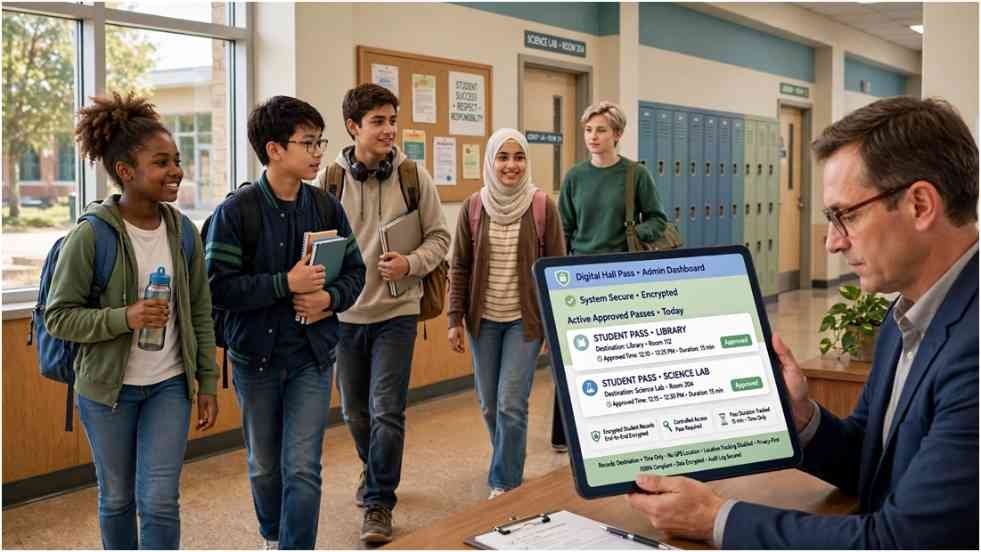
A digital hall pass sounds simple until it begins shaping who may leave class, when they may go, and how their activity gets recorded. Securly Pass can bring order to that process, but schools should judge more than convenience.
When I assess education technology, I test it through three lenses: teacher workload, student fairness, and administrative accountability. This method produces a clearer answer than asking whether the software is merely “good” or “bad.”
What Securly Pass Actually Does
Formerly called eHallPass, the platform digitizes hall-pass requests for K–12 schools. Students request permission through a browser, mobile application, or shared kiosk. Teachers approve passes, while authorized staff view active requests through a central dashboard.
The software records a student’s departure point, intended destination, approval status, and pass duration. It does not use GPS to verify the student’s physical position.
Current Securly Pass features include Contact Control, student limits, destination capacity rules, appointment passes, tardy management, visitor management, PBIS tools, and reporting. The official product page explains these features and their available workflows.
My Three-Lens Digital Hall Pass Evaluation
A feature list cannot show how a system affects a school day. My three-lens test examines the people who approve, use, and govern each pass.
The Teacher Lens
A teacher needs speed and minimal disruption. If approving a restroom request requires several screens, the digital system may consume more time than paper.
Integration with Securly Classroom addresses part of that problem. Teachers can approve, create, or close passes from their main classroom interface. Auto-Pass can also permit selected requests to begin under predefined rules.
However, the school should measure approval time during a pilot. A technically impressive feature has little value if teachers avoid using it.
The Student Lens
Students need a process that protects dignity and handles urgent situations. They should understand why a request was approved, delayed, or denied.
Rigid limits can create avoidable harm. A student with a health condition may need frequent restroom access. Another student may need regular counselor visits. Schools should configure individual accommodations before applying broad restrictions.
A portal such as MyKaty Cloud login demonstrates how students can reach several school services through one authenticated account. That convenience works only when access remains reliable and inclusive.
The Administrator Lens
Administrators need useful records without collecting unnecessary information. Reports may reveal long absences, crowded destinations, or repeated scheduling problems.
Those patterns require interpretation. Securly Pass data may show that one student frequently visits the nurse. It cannot explain the medical, emotional, or personal reason behind those visits. Administrators should investigate context before assigning consequences.
School Safety Features Worth Examining
The live dashboard gives authorized employees a current view of active passes. During an emergency, staff can identify students who were recorded as outside their classrooms and see their intended destinations.
That information may speed up accountability. It does not guarantee the student reached the displayed room. Schools must continue using established emergency procedures.
Contact Control prevents selected students from receiving simultaneous passes. This may reduce planned conflicts or prohibited meetups. Staff should document why they apply the restriction and review it regularly.
Destination limits can reduce overcrowding. Appointment Pass can schedule visits with counselors or staff members. Proxy Pass and Pass Kiosk provide options when a student lacks a personal device.
These features make Securly Pass more than a digital version of a paper slip. They also make configuration, training, and oversight essential.
Student Privacy and Fairness Concerns
A hallway record may appear harmless, yet repeated activity can reveal sensitive patterns. Trips to a nurse, counselor, special-education office, or other destination can expose personal circumstances when access is too broad.
Movement Records Are Education Data
Schools should define which employees may view active passes and historical reports. They should also establish a retention period and remove access promptly when an employee changes roles.
The US Department of Education provides FERPA resources that help schools understand their responsibilities for education records. District leaders should also review applicable state student-privacy laws and their contract with the vendor.
Vendor security claims deserve verification. Decision-makers should request information about encryption, incident notification, subprocessors, data deletion, backups, and account auditing.
Automated Limits Need Human Exceptions
No algorithm understands urgency without rules and human judgment. A destination limit may reduce crowding, but it should not delay medical care. A daily pass cap may discourage misuse, but it should not punish a documented accommodation.
Parents who use Amazon Parent Dashboard may already understand scheduled limits and activity controls. A school platform demands stronger safeguards because attendance, health needs, discipline, and education rights can overlap.
Login, Apps and Device Access
A school normally provides the correct Securly Pass link and approved sign-in method. Users may authenticate through a district-supported provider such as Google or Clever.
Students and staff can access the service through a supported browser. Native applications are also available, including the Apple App Store version.
Login failures often involve the wrong school account, expired sessions, blocked cookies, or an incorrect district link. Users should contact school IT rather than submit credentials to an unofficial login page.
Device access also affects equity. Schools should prepare Proxy Passes and shared kiosks before rollout. No student should lose legitimate hallway access because a battery died or a device remained at home.
A Worked Cost-and-Time Example
Consider a school with 60 teachers. Suppose each teacher handles eight hall-pass requests daily, and paper processing takes 25 seconds per request. That equals 200 minutes of staff time each day.
If Securly Pass reduces the average action to 10 seconds, the school saves about 120 minutes daily. Across 180 school days, that equals roughly 360 staff hours.
This is an illustrative calculation, not a guaranteed result. A pilot should measure the school’s real approval times before and after implementation. Administrators can then compare saved time with licensing, training, support, and integration costs.
The same pilot should track mistaken denials, technical failures, student complaints, and accommodation exceptions. Efficiency alone does not prove success.
The Federal Trade Commission’s education technology guidance also helps explain why collecting information from children requires careful governance.
Questions Schools Should Ask Before Buying
School leaders should request direct answers to a small set of operational questions:
- What is the complete cost, including setup, support, and integrations?
- Which student fields enter the platform?
- How long does the vendor retain pass history?
- Can the district export and delete its information?
- Which functions remain available during an outage?
- How are medical and disability-related exceptions configured?
- Which reports can teachers, administrators, and district staff access?
- What training will students, families, and employees receive?
A strong vendor should answer these questions in writing. Schools should then place the answers beside their own policy requirements.
The Hallway Verdict: Policy Before Platform
I would not judge Securly Pass solely by its polished dashboard. Its real value depends on faster teacher decisions, fair student rules, accurate rosters, secure access, and sensible data use.
A school should run a limited pilot before district-wide adoption. Test normal requests, emergencies, medical exceptions, shared devices, and network outages. Gather feedback from students as well as staff.
The sassiest truth is also the simplest: software cannot supervise a hallway or repair a weak policy. Configure the rules first, train the people second, and activate the platform third.
Frequently Asked Questions
1. Is Securly Pass the same as eHallPass?
Yes. The product formerly known as eHallPass now operates under the Securly brand.
2. Does Securly Pass know a student’s exact location?
No. It records pass information and intended destinations but does not use GPS tracking.
3. Can a school use Securly Pass without student devices?
Yes. Proxy Pass and Pass Kiosk support teacher-issued and shared-device workflows.
4. Is Securly Pass free for students?
Students generally do not purchase it directly; participating schools or districts license the platform.